This post is based on a talk I co-presented with Victor Monga at the Cloud Security Alliance, Los Angeles chapter. You can watch the full talk on YouTube.
As containers and Kubernetes become the default way companies build and ship applications, securing them requires a fundamentally different mindset. Traditional perimeter security isn’t enough — you need to think in layers. In this talk, Victor and I walked through a defense-in-depth model for containerized environments, covering seven distinct layers from the kernel up to the public cloud.
Why This Matters
Application usage is growing, and companies are increasingly adopting cloud-native architectures to scale with that demand. The shift to microservices and containers brings real operational benefits — individual scalability, minimal downtime, flexible hardware requirements — but it also introduces a new attack surface at every layer of the stack.
Kubernetes environments aren’t immune. CVEs like CVE-2020-8555 and CVE-2020-8558 show that the orchestration layer itself can be exploited for data exfiltration or unauthorized container access. And beyond platform-level vulnerabilities, application-layer attacks like Remote Code Execution (CVE-2017-5638, the Apache Struts vulnerability behind the Equifax breach) and Server-Side Request Forgery (the vector used in Capital One’s 2019 breach) can sail right past infrastructure-level controls undetected. This is why layered security matters.
The 7 Layers
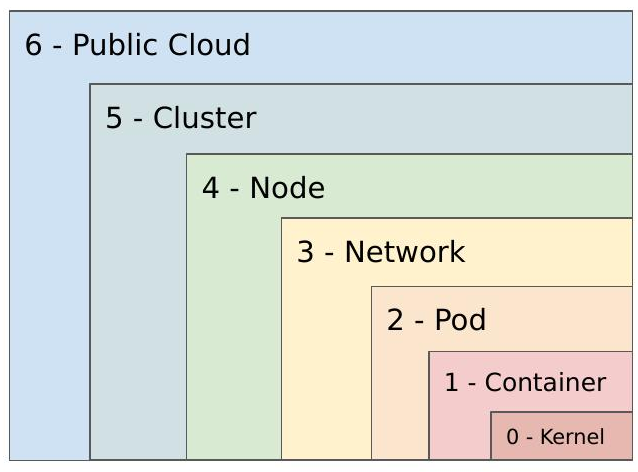
Layer 0 — Kernel
Everything runs on the kernel, so it’s where you start. Keep kernel versions patched, review and remove unnecessary system calls, and consider additional container sandboxing tools like gVisor or Kata Containers to create a stronger barrier between the host OS and the workloads running on top of it.
Layer 1 — Container (Build and Runtime)
At build time, reduce your attack surface: use minimal base images, remove unnecessary packages and network utilities, scan images for vulnerabilities and misconfigurations, and only pull from known-good sources. Validate image integrity throughout your CI/CD pipeline.
At runtime, use ephemeral containers for live debugging rather than shelling into production containers. Watch for anomalous system-level events — unexpected child processes, shells spawned inside containers, or sensitive files being read unexpectedly. These are often early indicators of compromise.
Layer 2 — Pod
A Pod is a collection of containers, and Kubernetes gives you meaningful controls at this level. The Pod Security Context lets you define privilege and access settings: whether containers run as privileged, the user and group IDs for processes and volumes, granular Linux capabilities (drop what you don’t need), Mandatory Access Controls via seccomp, AppArmor, or SELinux, filesystem permissions, and privilege escalation controls. Pod Security Policies enforce these settings as cluster-level requirements, ensuring pods that don’t meet your standards can’t be admitted.
Layer 3 — Network
By default, pods can talk to any other pod in the cluster — which makes lateral movement trivially easy for an attacker who gets a foothold. Network Policies let you segment communication between pods and endpoints, explicitly defining what can talk to what. Be mindful that the Kubernetes API is accessible from inside the cluster; if a Service Account doesn’t need API access, don’t mount those credentials into the container. For egress, explicitly allowlist which pods need internet access and monitor everything else. A service mesh like Istio or Envoy gives you fine-grained control over inter-workload traffic and supports mutual TLS.
Layer 4 — Node
The nodes hosting your pods need the same attention as any other asset in your environment. Check for open ports and services (kubelet is a common exposure point), limit external administrative access to nodes and the control plane, keep base operating systems minimal, harden them to CIS Benchmarks, and treat them like any other system in your vulnerability management program — scan and patch regularly.
Layer 5 — Cluster
Securing the Kubernetes system components prevents backdoor access to the cluster itself:
- kube-apiserver: Disable unauthenticated and anonymous access, restrict public network access, consider Image Policy Webhook to block unapproved images.
- kubelet: Disable anonymous access and set Node Restriction controls to limit what kubelet can reach.
- etcd: All communication should happen over TLS.
- Secrets: Don’t pass secrets as environment variables. Mount them as read-only volumes and scope access to only the deployments that need them.
- RBAC: Apply the principle of least privilege across service accounts and roles.
- Audit logging: Enable it and forward logs to a SIEM so you can identify suspicious activity at the cluster level.
- Third-party components: Know what’s running in your cluster and stay on top of vulnerabilities in those dependencies.
Layer 6 — Public Cloud
For managed Kubernetes offerings like EKS, GKE, or AKS, understand what each platform gives you and what you’re still responsible for. Look at supported Kubernetes versions, available container runtimes, access controls, logging and monitoring integrations, encryption capabilities, and SLAs. Each cloud provider has its own feature set — for example, GCP’s Cloud Key Management Service enables application-layer encryption of secrets. Choose the option that fits your requirements and know exactly where the shared responsibility line is drawn.
Defense in Depth
The key takeaway is that no single layer is sufficient. Each layer assumes the others may be compromised. A container with a vulnerability doesn’t mean the pod is compromised; a compromised pod doesn’t mean the node or cluster is. Applied correctly, this model limits blast radius and gives you multiple opportunities to detect and stop an attacker at each stage.
Watch the full talk on YouTube. Thanks to Victor Monga for co-presenting, and to the Cloud Security Alliance, Los Angeles chapter for hosting.